
I know what you’re thinking: the term “game changer” is rolled out a lot these days, and I tend to agree. That said, I did ask Copilot to give me 10 better variations of “Teams Phone Extensibility for Dynamics 365 Contact Center & ISV Solutions has landed – why this is a good thing”, and this is what I’m going with. Oh hell I’m owning it: it IS a game changer for any organisation that has\wants Teams Phone for PSTN calling AND wants to use a Teams PSTN connectivity option for their Dynamics 365 Contact Centre (or other ISV certified contact centre solutions…)
I’ll explain.
In March 2025, Microsoft announced Teams Phone extensibility for Dynamics 365 Contact Center and certified ISV solutions – powered by Azure Communications Services. This was welcome news for those of us that play in the Microsoft Converged Communications space – but what exactly does it mean?
Background: Dynamics 365 Customer Service\Contact Center
Before we look at the Teams Phone extensibility bit, it will be worth going over what’s happening in the contact center space from a Microsoft perspective.
In June 2024, Microsoft announced the general availability of Dynamics 365 Contact Center – a Copilot-first cloud contact center that’s designed to transform service experiences. Whilst this was welcome news, it wasn’t in fact the first time Microsoft offered “first party” voice capabilities with a Dynamics 365 product. Here’s the announcement from November 2021 when voice channel was introduced to Dynamics 365 Customer Service.
So, what changed in 2024?
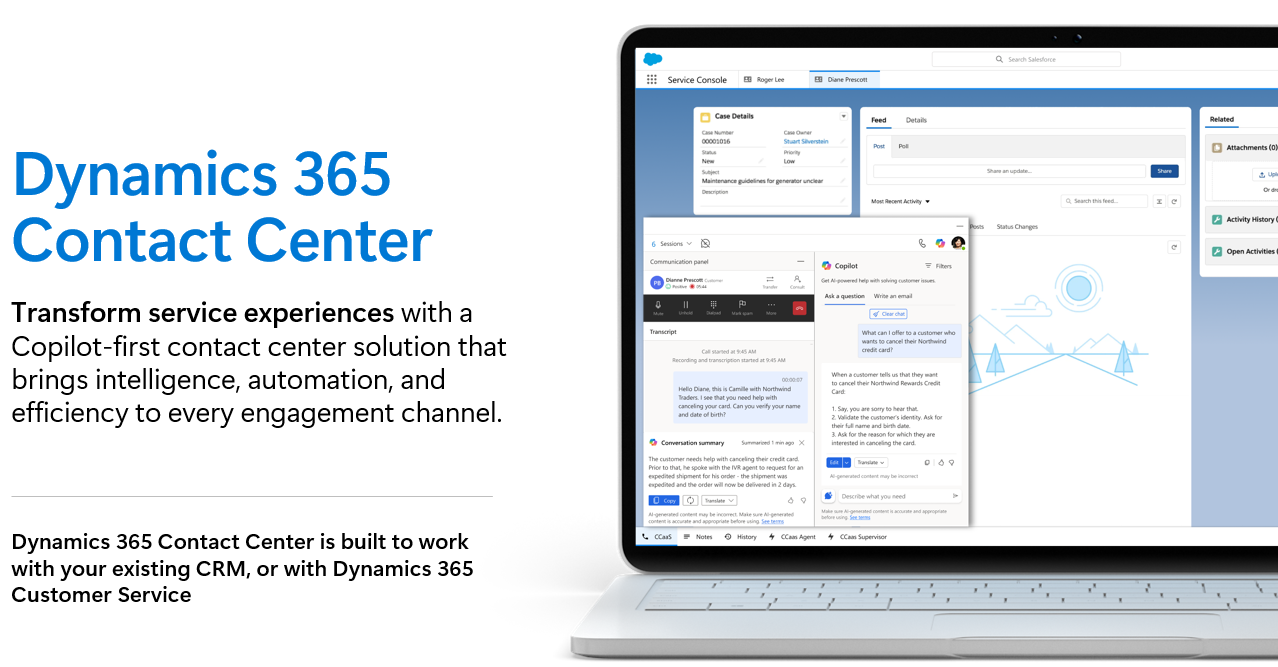
Prior to the June 2024 announcement, the only option for voice channel within Dynamics was within the Customer Service product: a full-blown CRM platform, with a focus on managing customer interactions and cases end to end. The addition of voice channel was great for existing Dynamics 365 Customer Service customers that wanted to expand on omnichannel capabilities and add voice, or for greenfield deployments where Dynamics 365 Customer Service made sense. But what about organisations that were using something else for CRM and case management? Perhaps they were using something else already (Salesforce or Service Now for example)? That’s what the 2024 announcement was all about: the release of Dynamics 365 Contact Center which would allow for deployment alongside an existing CRM platform – opening up a greater number of deployment scenarios and opportunities – a standalone contact centre solution:

In the following example, note the Salesforce icon top left, and the embedded Dynamics Contact Centre widget providing the contact centre capabilities over the top – this is one possibility with a decoupled contact centre solution from Microsoft:
Regardless of option chosen, there’s a number of prerequisites required when deploying voice channel with Dynamics 365, one of them being Azure Communication Services:
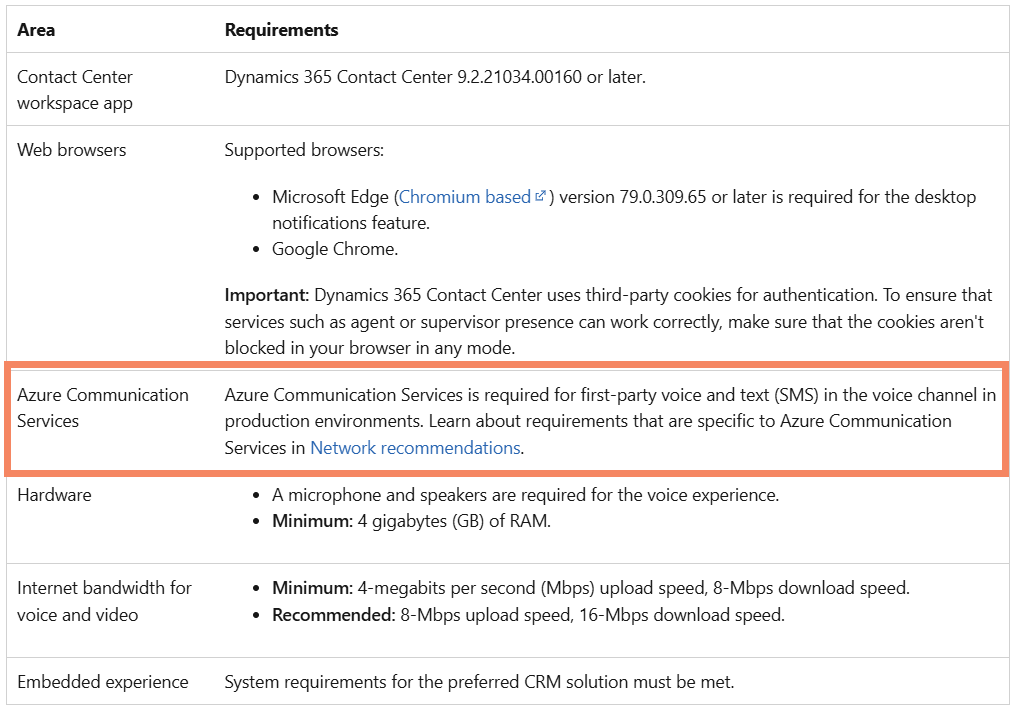
So it’s probably worthwhile spending a bit of time explaining:
What exactly is Azure Communications Services, and what does it do?
Found via the Azure Portal, Azure Communications Services (ACS) is a set of tools provided by Microsoft that allows developers (via APIs and SDKs) to add communication features like voice calls, video calls, chat, and text messaging to their applications. It provides a way to integrate communication capabilities into your apps without needing to build everything from scratch. In addition, ACS also forms part of the architecture that underpins Microsoft Teams communications: voice, video, and chat are all possible in Teams thanks to ACS. Keep this in mind as we explore Teams Phone extensibility further.
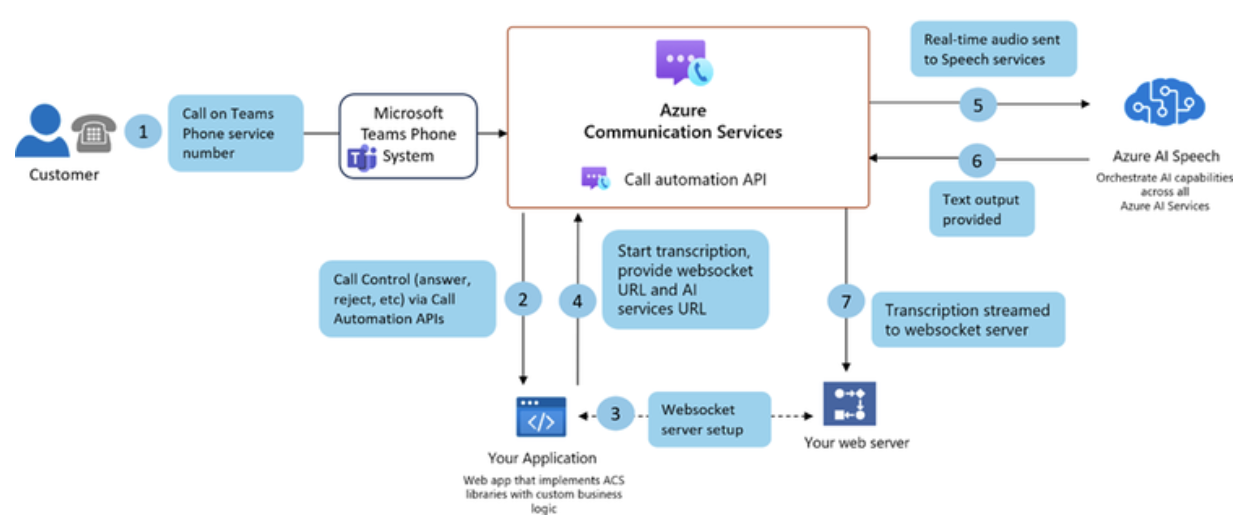
Bringing it back to Dynamics 365 Customer Service\Contact Center: either option is essentially an app built in Power Platform, and just like any other app that might want access to voice channel and PSTN calls, ACS is what’s providing this:
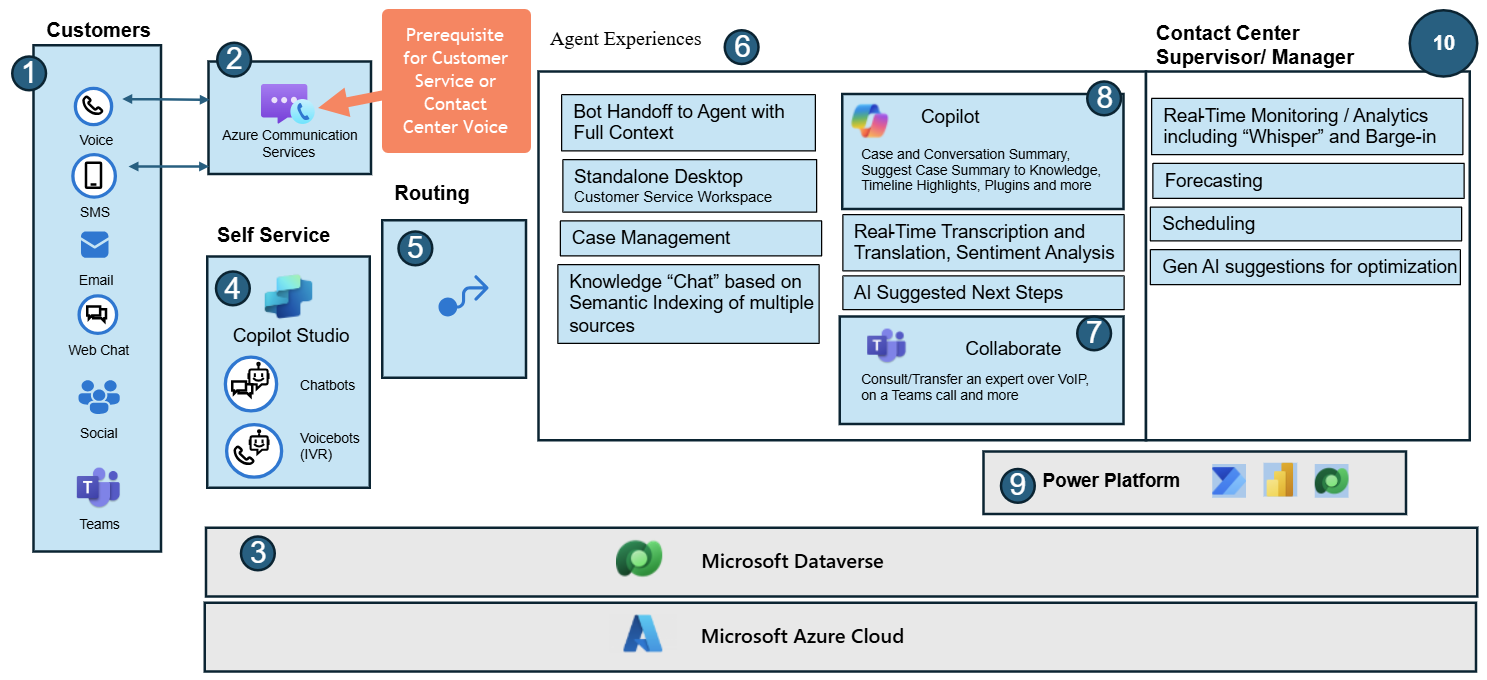
Other ISV Contact Center Solutions?
Aside from Dynamics 365 based solutions, there are other Independent Software Vendors (ISVs) that develop certified contact centre solutions – built on ACS. At time of announcement, these were Anywhere365, AudioCodes, ComputerTalk, Enghouse, IP Dynamics, Landis, and Luware. All of these ISVs will also benefit from Teams Phone Extensibility, and have been given the certified tick of approval from Microsoft. However, it’s worth noting that there’s no requirement to be certified to use it if you happen to have your own application that’s leveraging ACS for the voice bits. This was called out in the official announcement also:

Now that we’ve covered off on contact centre and ACS components and what ACS is doing for the various contact centre solutions, what’s changed with the Tams Phone Extensibility announcement?
PSTN Calling with ACS (pre Teams Phone Extensibility Announcement)
Prior to Microsoft announcing Teams Phone extensibility, there were a couple of ways to get a PSTN call into and out of ACS:
- Request a direct phone number from Microsoft (similar to requesting a service number for use with Teams Phone if you’re familiar with that), or
- Configure an Azure Direct Route (not to be confused with a Teams Direct Route – more on that later).
Once an Azure Communication Service instance is deployed in Azure, here’s where you’ll find them:
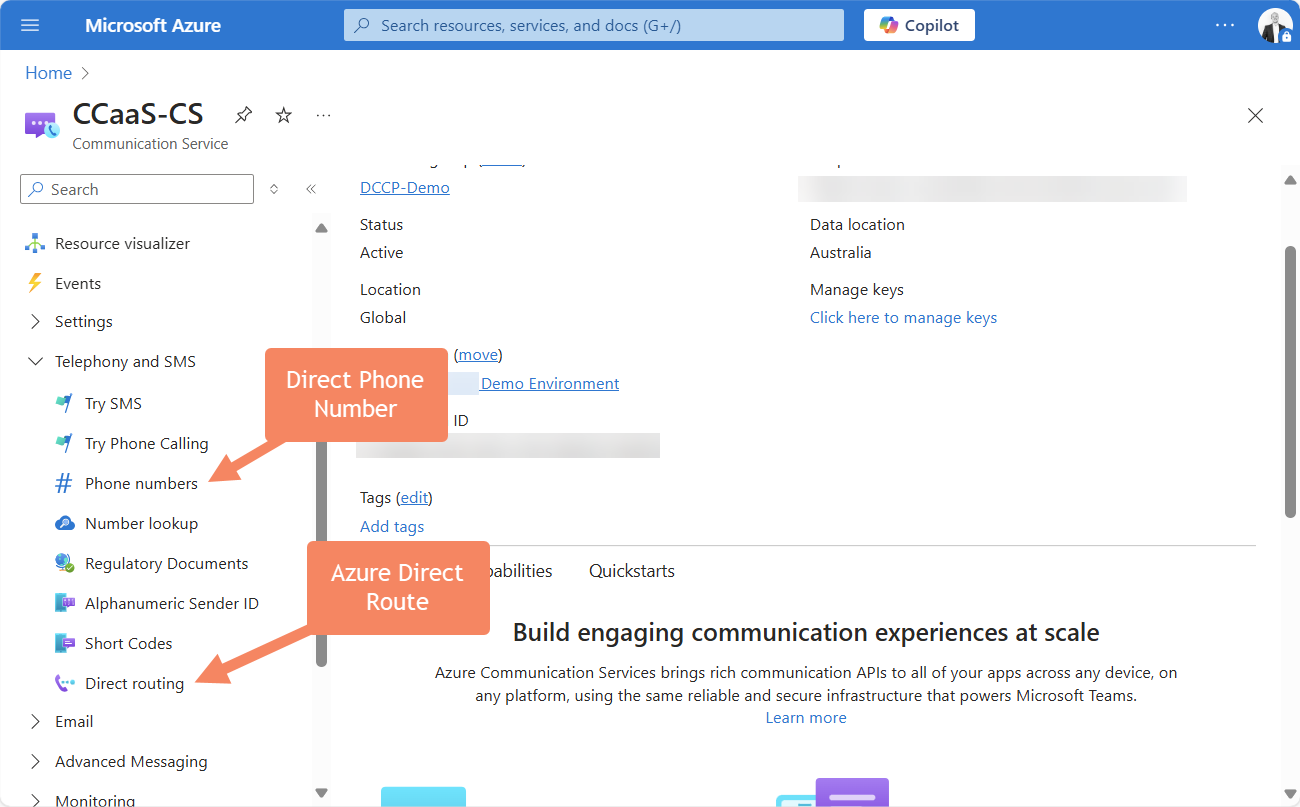
A little bit more detail on each of these existing options:
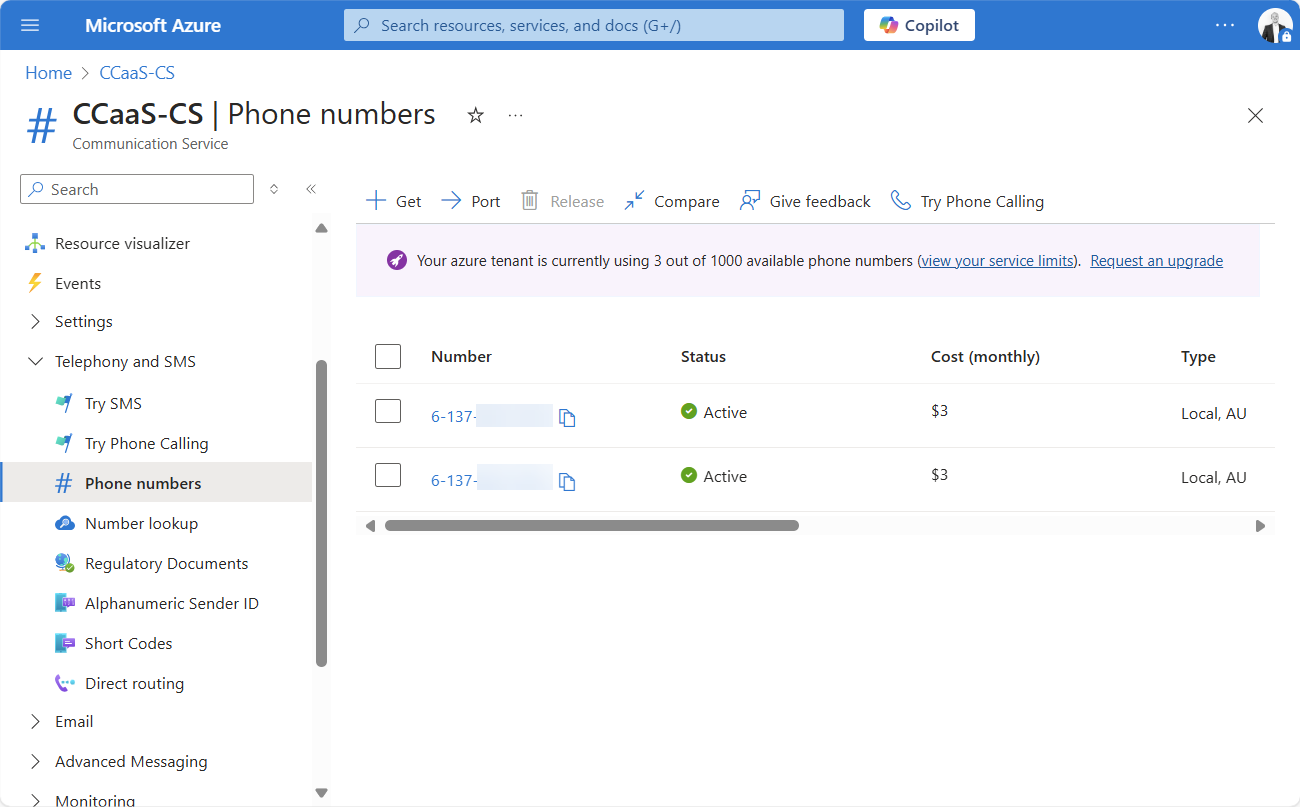
Direct Phone Number
As the name suggests, phone numbers are requested and provisioned by Microsoft, which can then be used to make and receive calls from an application. Of the two options available in ACS today, this is the simplest way to get PSTN calls up and running:
Azure Direct Routing
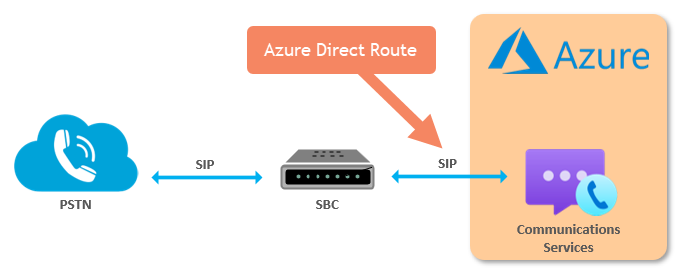
Another option to enable PSTN calling with ACS is via Azure Direct Routing. It’s essentially a SIP Trunk between a Session Border Controller (SBC) and ACS:
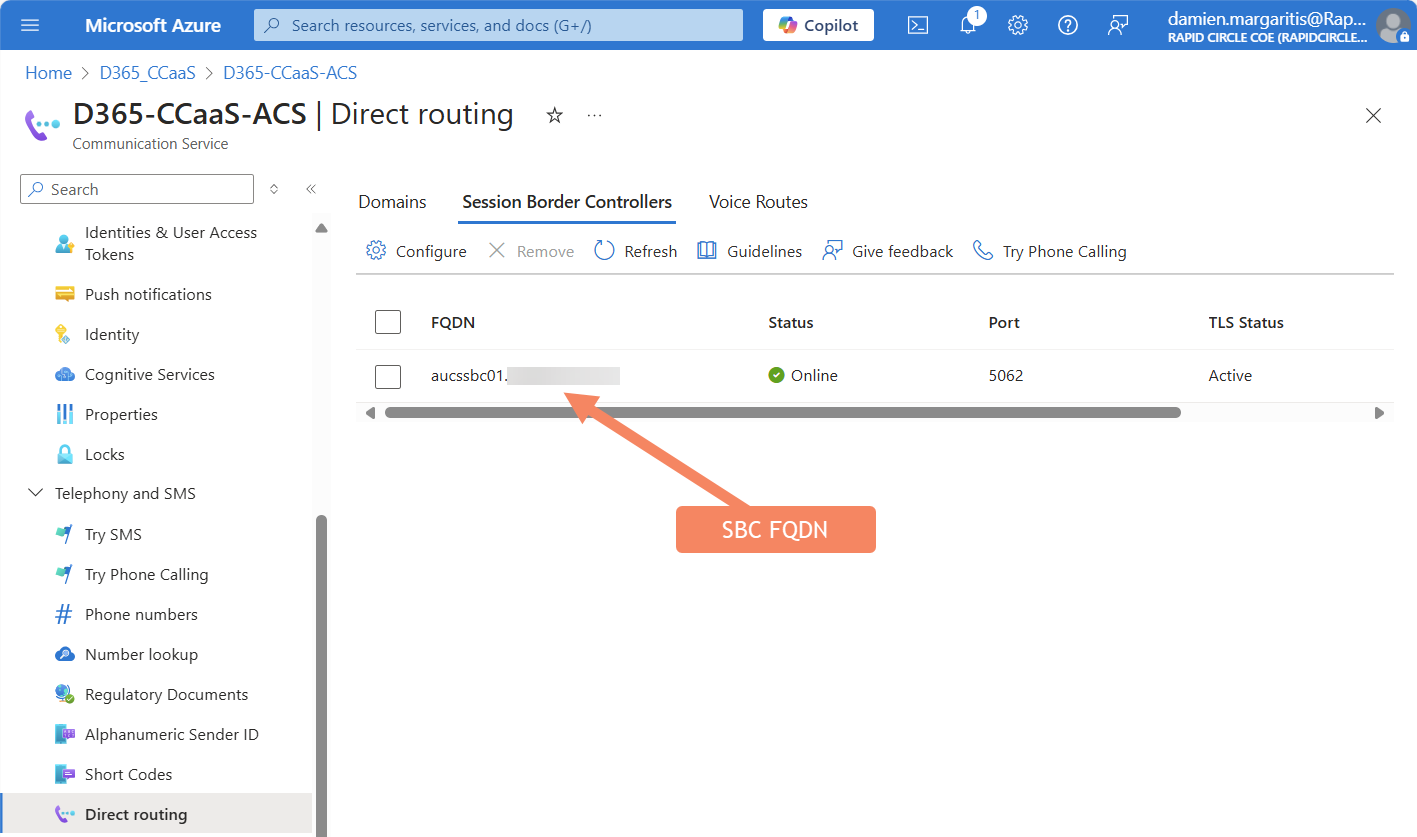
In the example above, aucssbc01.domain.com.au is the FQDN of an SBC that in this case, happens to be hosted in Azure but could be hosted on-prem, carrier hosted, etc:
Side note: In Australia, Azure Direct Routing was the only way that PSTN numbers could be commissioned within ACS, at least initially. Phone Numbers provided by Microsoft were not supported in all global locations on release. That’s now changed, Australian numbers can now be requested, but you do still have to fill out a special request via the Phone Number Service Center. Takes a day or two to process, so if you do plan to use this method, plan ahead.
Teams Phone PSTN Connectivity – A Refresher
Before I finally get to my point and explain why I think Teams Phone Extensibility for Dynamics 365 Contact Center & ISV Solutions is a total game changer, over in the world of Teams what options are available to connect to the PSTN? Essentially, they boil down to three (yes technically four if you include Teams Phone Mobile – see my asterisk below):
- Teams Phone Calling Plan
- Known as Telstra Calling Plans in Australia.
- Teams Direct Routing
- A SIP trunk between an SBC and Teams Phone in Microsoft 365.
- Operator Connect
- Pre-qualified, carrier managed PSTN calling and SBCs managed for you.
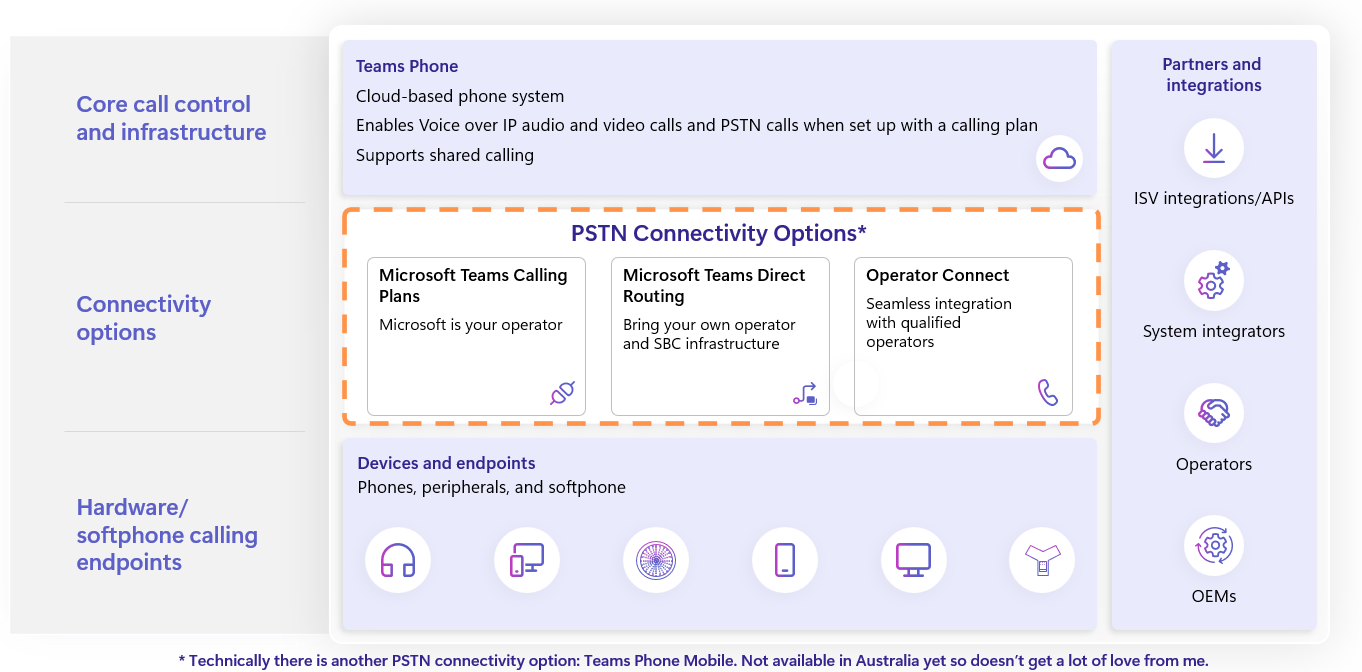
When deploying Teams Phone, one of these (or sometimes more than one) are provisioned in order to provide connectivity between Teams and the PSTN. It’s a prerequisite: the plumbing that’s going to allow PSTN phone calls from a Teams client.
Aside: In addition to Teams Phone connectivity options above, there is also the concept of a Service Number in Teams Phone System: the ability to request a phone number direct from Microsoft to use in a few different scenarios, including assigning to Teams Auto Attendant or Call Queues. Whilst not clear at this stage, it’s possible these may also be able to be leveraged with Teams Phone extensibility for contact centre use cases. Would make for a much smoother migration from native Teams call flows to a CCaaS solution if that were true. This will make more sense once I’ve covered off on what Teams Phone extensibility actually is below.
So Why is Teams Phone Extensibility a Game Changer?
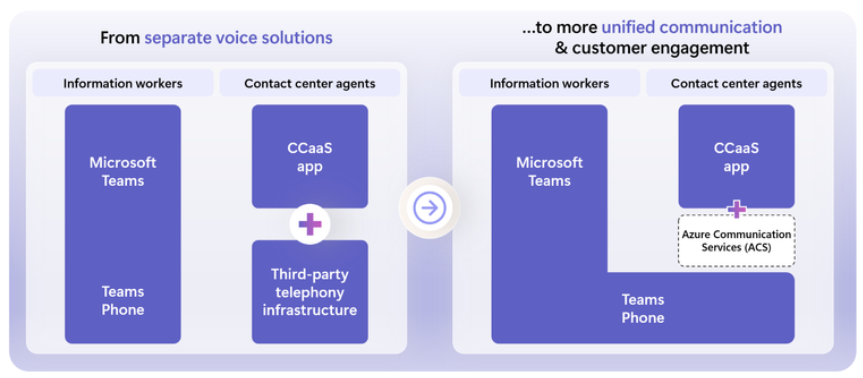
For organisations that have PSTN connectivity infrastructure in place to support Teams Phone, wouldn’t it be great if we could use the same infrastructure to support PSTN calling from Dynamics 365 Contact Centre (or one of the other certified contact centre ISVs that are using ACS)? That’s precisely what Teams Phone extensibility will allow.
No longer will I have to request a phone number from ACS or configure an Azure Direct Route (particularly if I already have a Teams Direct Route) – I can just use what I already have, or if I’m migrating to Teams phone and also want to bolt on a contact centre solution, my architecture is simplified.
What about if I’m using Teams Direct Routing to enable PSTN calling for Teams Phone? Can’t I just use the same SBC infrastructure to support Azure Direct Routing too?
Yes, absolutely. However, it is not supported to use the same direct route for both Teams and Azure Direct Routes: you need to deploy two (prior to this announcement of course). Phone numbers for Teams would go via the Teams Direct Route, Calls to ACS via the Azure Direct Route:
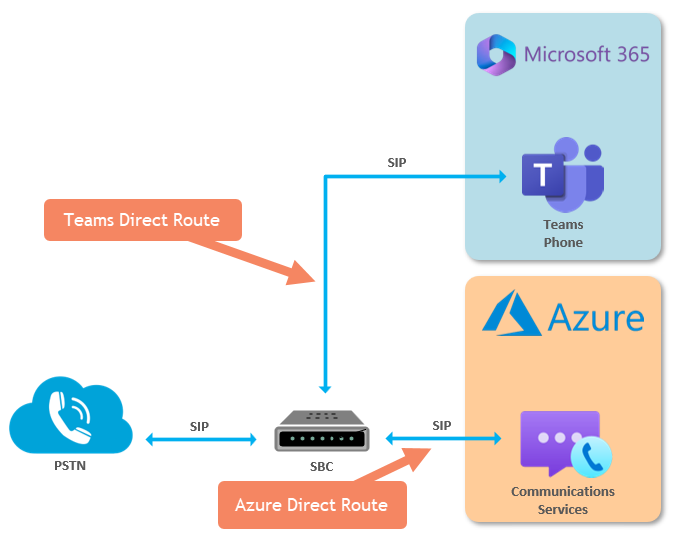
To be honest, adding an addition direct route isn’t too tedious, but it did mean that more configuration on the SBC was required, more firewall ports to open, more public certificate FQDNs needed (as each Direct Route would have a unique FQDN configured on the SBC so Teams and ACS knew where to send calls), and frankly it’s just simpler if I can just use one Direct Route, particularly given that both actually route to the same destination cloud side. Here are the destination FQDNs listed in Microsoft’s documentation for Teams Direct Routing and Azure direct routing respectfully – note that they are identical:
From Plan for Teams Direct Routing:
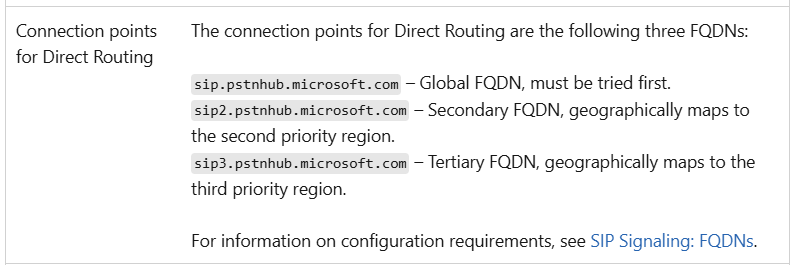
From Azure Direct Routing Infrastructure Requirements:
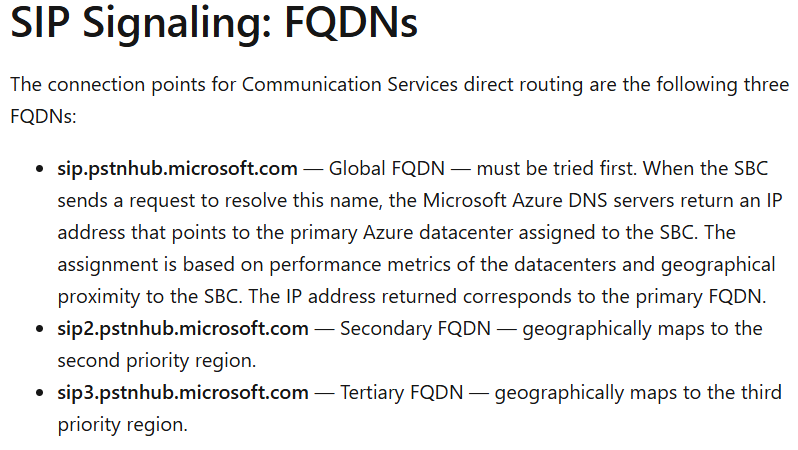
Which goes to my earlier point: Teams is already using ACS for calling – this kind of proves it.
What Else will be Possible?
In addition to simplifying connectivity to the PSTN by consolidating telephony infrastructure for UCaaS (Teams) and CCaaS (D365\ISVs), there are a number of other features and capabilities we expect to see unlocked with this announcement, including:
- Gen AI Integration: Utilize AI to streamline processes and empower customer service agents with automation capabilities, with direct access to Azure AI technology.
- Extend UCaaS Capabilities to CCaaS: Take advantage of Teams Phone enterprise features, including emergency calling, dial plan policies, wide geographic availability of Public Switched Telephone Network (PSTN) connectivity options and much more from CCaaS solutions.
- Agent Notification handling: Allow data segregation between CCaaS persona and UCaaS persona with the choice of ringing either the Teams standard client or a CCaaS application.
- Cost Efficiency: Enable ISVs to build cost-effective solutions using existing Teams Phone plans, without adding Azure Communication Services numbers or Azure Direct Routing.
Final Thoughts
The integration of Microsoft Teams Phone system with ACS-powered contact center solutions marks a significant advancement in the way organisations can simplify their communication and customer support capabilities. This convergence not only streamlines the user experience, but also brings greater efficiency and simplicity to UCaaS and CCaaS deployments. As businesses continue to adapt to evolving communication needs, leveraging these powerful tools will be essential for staying competitive and providing exceptional service to customers. The future looks promising as we embrace these innovative solutions to create more connected and responsive environments (thanks Copilot).
Damien is the Global Solutions Director for Microsoft Converged Communications at Rapid Circle: a global organisation dedicated to creating impactful solutions with the Microsoft Cloud.


Leave a Reply