When deploying Cloud Connector Edition, I would have to say that Sonus’ CloudLink offering has made life a lot easier. A single 1RU appliance that houses everything I need to enable PSTN access for Skype for Business Online CloudPBX users, and also allow integration with existing on-premises solutions the customer may be migrating away from.
That said, I have run into the odd issue here and there, none of which have been show stoppers but have needed investigation just the same.
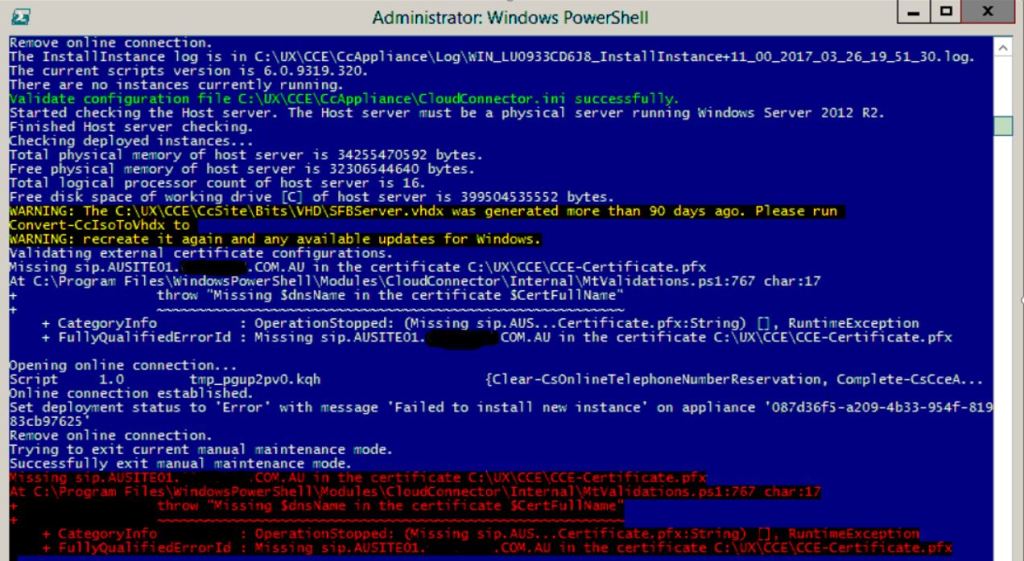
On my latest deployment, I ran into the following error when attempting to run Install-CcAppliance:

Missing sip.AUSITE01.DOMAIN.COM.AU in the certificate C:\UX\CCE\CCE-Certificate.pfx
At C:\Program Files\WindowsPowerShell\Modules\CloudConnector\Internal\MtValidations.ps1:767 char:17
+                 throw "Missing $dnsName in the certificate $CertFullName"
+                 ~~~~~~~~~~~~~~~~~~~~~~~~~~~~~~~~~~~~~~~~~~~~~~~~~~~~~~~~~
+ CategoryInfo          : OperationStopped: (Missing sip.AUS...Certificate.pfx:String) [], RuntimeException
+ FullyQualifiedErrorId : Missing sip.AUSITE01.DOMAIN.COM.AU in the certificate C:\UX\CCE\CCE-Certificate.pfx
For this deployment, there were two SIP domains that were to be supported, and AUSITE01.domain.com.au was not one of them. This was in fact the External Edge Pool FQDN. When preparing CCE for deployment via the Sonus Web GUI, these entries are not manually populated: they are pulled from the certificate SAN list once the public cert has been uploaded. If there is no corresponding SIP.domain.com.au entry in the SAN list for SIP domains that are to be supported, install will fail.
Manually checking the CloudConnector.ini file, I confirmed that there was an additional SIP domain that should not be present (the middle entry):

Simply removing this from the config file and re-running Install-CcAppliance resolved the issue.
Damien Margaritis


 dmunified
Leave a comment