This is something I’ve been meaning to write since the release of Lync Server 2013. However, I’ve been waiting to have all the components I need in my lab to successfully capture all the relevant screenshots and traces, and for Microsoft to resolve a bug with the Mediation server role that was rectified with CU3 (more on that later). This article is broken into the following sections:
- Overview
- Terminology
- Lync call forwarding behaviour
- What’s the Problem?
- What’s the Fix?
- Configure Lync to present B Party information in Sim Ring/Call Forwarding SIP INVITE
- Configure Sonus SBC gateway to manipulate Sim Ring/Call Forwarding SIP INVITE
NOTE: To carry out the configuration changes outlined in the fix section of this article, it is assumed that the reader has an in depth understanding of Lync Enterprise Voice configuration (particularly the Mediation server role and the SIP protocol) as well as experience configuring Sonus Session Border Controllers (SBCs).
Overview
Terminology
Before looking at the technical configuration aspects of this post, here’s a brief overview of some of the terms I’ll be using:
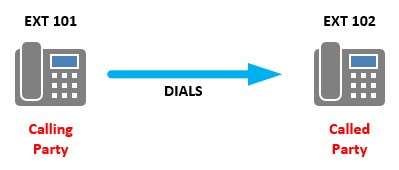
Called/Calling Party
These terms refer to an endpoint that initiates a call (calling party) and an endpoint that receives the call (called party).
A/B/C Party
When displaying call flows for calls that are forwarded to another destination, it’s common to see the parties involved in the call flow referred to as A, B and C Party:
- A Party: The endpoint that initiates the call
- B Party: The endpoint that receives the call
- C Party: The endpoint the call is ultimately forwarded to

SIP INVITE: FROM/TO
To facilitate the setup, management and tear down of calls, the SIP protocol makes use of SIP Headers. This article is concerned with the SIP INVITE header, and how we manipulate it with the help of a Session Border Controller (SBC) to achieve a desired outcome. Within the header is a number of fields, each of which has a specific purpose to assist with communication between two endpoints (Nick Galea over at 3cx.com has a great blog post that explains the SIP HEADER in greater detail). The two fields within the header that are of interest for this article are the FROM and TO fields. The FROM field is used to identify the initiator of the request, while the TO field specifies the logical recipient of the request (simplified descriptions, but sufficient for the scope of this article).
Lync Call Forward Behaviour
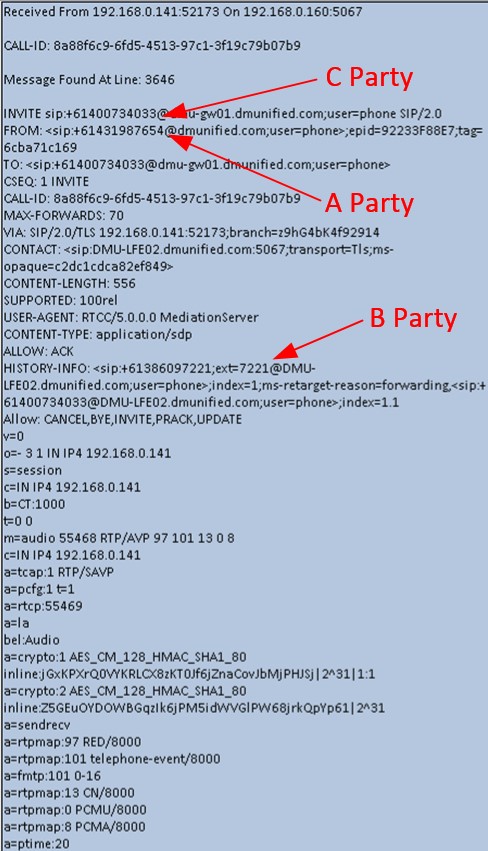
When a Lync user has their client or device configured for call forwarding or simultaneous ring, the Mediation server initiates an outbound call on behalf of the user to the C Party endpoint. When constructing the SIP INVITE for this call, Lync will use the C party number in the TO field of the SIP header (called number) and the A party number in the FROM field of the SIP header (calling number).

The important takeaway from this is that the B Party number (the Lync user’s number) is not present in the outbound INVITE.
What’s The Problem?
The lack of B party information in the outbound SIP INVITE first started to cause problems for me on deployments once SIP Trunks (as opposed to ISDN trunks) started to become more widely adopted on Lync deployments. When deploying ISDN trunks, this issue usually remained unnoticed. Why?
If you think about a standard call from Lync to the PSTN, you have the usual called and calling parties: A Party is the internal Lync user, and B party is the PSTN number you’re dialling. Before the call is routed out to the PSTN, you will typically manipulate the called and calling numbers into a format the trunk provider is expecting. For example:
| E.164 From Lync | Manipulate To | |
| Called Number | +61400734033 | 400734033 |
| Calling Number | +61386097221 | 386097221 |
If you get the called number manipulation wrong, the call will fail, as the Telco won’t know where to route your call. If you get the calling number manipulation wrong, and the trunk to the PSTN trunk is using ISDN, the Telco will usually replace the incorrect number with the pilot number for the trunk; for example 0386097220 (commonly, the pilot number is reception or the main Auto Attendant number). However, if the trunk to the PSTN is a SIP Trunk, some Telcos will drop the call. This is because the Telco does not recognise the B Party number as being part of the number range your organisation owns. When tracing, this is commonly represented by a 404 Not Found response from your SIP trunk provider.
Applying the above logic to Simultaneous Ring or Call Forwarded calls, you may start to see where the issue arises. If the B Party number (the Lync User’s number) does not appear anywhere in the outbound SIP INVITE, it’s impossible for me to manipulate out into the FROM field of the SIP header.
Even when working with SIP Trunk providers who do not drop the call, and treat the call the same was as ISDN (replacing Calling Number with the pilot number), it is still of benefit to know what the B Party number is for outbound calls, for a couple of reasons:
- Better decision point for users receiving a forwarded/simultaneous ring call
- When a user receives a simultaneous ring call on their mobile phone, the call appears to be coming from their own Direct in Dial (DID) number instead of the Pilot number for the organisation. Either someone is standing at their desk and calling them from their phone (unlikely), or they can be confident in the fact that this is a forwarded/simultaneous ring call for them, and not a call from reception.
- Deployments with multiple area code SIP trunks deployed on a single gateway
- For sites with a single area code SIP trunk terminated on their SBC, not knowing the B Party number and displaying the Pilot Number for forwarded/simultaneous ring calls may not be a problem. But what about deployments that have multiple area code SIP Trunks terminated on a single SBC? How would you know what pilot number to use for the Calling Number field? Knowing the B Party numbers resolves this issue.
What’s the Fix?
In the following configuration/traces, I’m using the following parameters:
A Party: +61 431 987 654 (Call From PSTN)
B Party: +61 3 8609 7222 (Lync user Patrick Bateman)
C Party: +61 400 734 033 (Patrick Bateman’s Mobile)
Lync 2010
The Lync Server 2010 Cumulative Update 2 (CU2) introduced a fix that allowed for B Party information to be present in the outbound call forwarding/simultaneous ring INVITE. Below is a trace of a simultaneous ring outbound SIP INVITE without the fix (note the lack of B Party information anywhere in the INVITE)

Applying the Fix
Lync Server 2010 Configuration
- Ensure at least CU2 is applied across your Lync 2010 environment
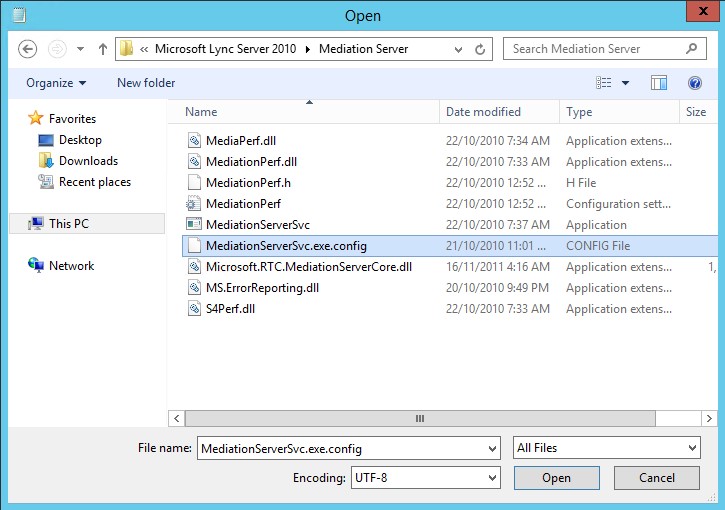
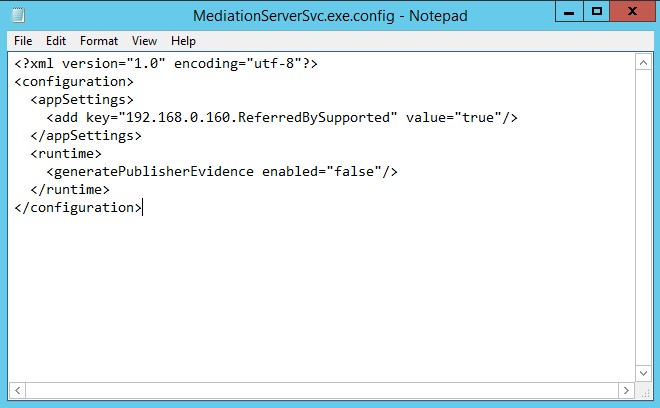
- On each Lync 2010 Server in your deployment hosting the Mediation Server role, run Notepad as an administrator and open MediationServerSVC.exe.config located in Program Files > Microsoft Lync Server 2010 > Mediation Server:
- You should be presented with this:
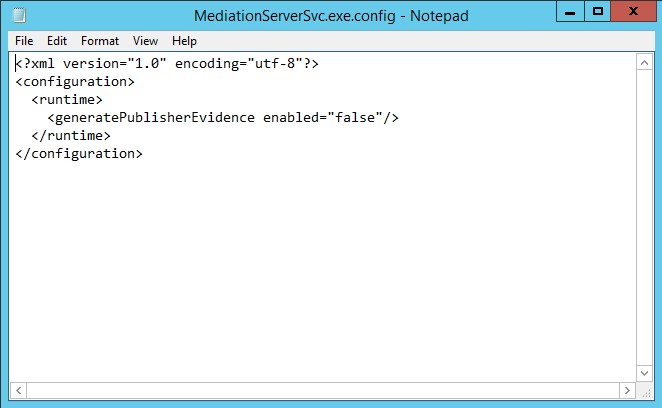
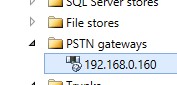
- Add in the following configuration (highlighted in red below) with one “add key” entry required per PSTN gateway in your deployment. In this example, the PSTN gateway is configured to communicate via TCP (unsecured), so the IP address of the gateway was configured in Topology Builder instead of the FQDN. Make sure you enter in the FQDN of the PSTN gateway if that’s what you have used in your deployment:
| <?xml version=”1.0″ encoding=”utf-8″?><configuration> <appSettings>
<add key=”192.168.0.160.ReferredBySupported” value=”true”/> </appSettings> <runtime> <generatePublisherEvidence enabled=”false”/> </runtime> </configuration> |
- For the change to take effect, you’ll need to restart the Mediation service (if the service fails to start, you’ve made a mistake when editing the MediationServerSVC.exe.config file. Fix the errors, and try again):

Looking at a call trace now, notice the addition of B Party information now contained in the REFERRED-BY Field:

Now that we have the B Party information we want in the SIP INVITE, the next step is to configure the SBC to take this value and use it as the Calling Number for the outbound SIP INVITE to the SIP Trunk provider. In this example, we are using a Sonus SBC1000 as our Session Border Controller.
Sonus SBC 1000 Configuration
- First up, let’s look at the existing Lync – ITSP transformation table I had configured that did not take into account the Referred-By B Party value for the outbound INVITE:

- Using this as a base, here’s a new table I created where I’ve added a new entry: Redirecting Number:

- The Input Field Type Redirecting Number will take the Referred-By value, and as shown above we are outputting to Calling Address/Number. The second Redirecting Number entry is a catch all, ensuring the route table entry is still valid for non-forwarded call that won’t have the Referred-By field present.
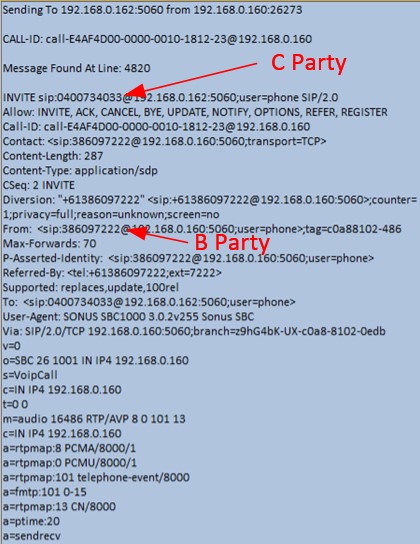
With this configuration in place, when an outbound SIP INVITE is received at the SBC with REFERRED-BY in the header, the B Party number is manipulated by the new transformation table and slotted into the Calling Number field on the outbound SIP INVITE to the ITSP. Looking at the trace below, you can see the Received Simultaneous Ring INVITE (Arrived 22) showing the A and C Party, followed by the INVITE that’s sent to the SIP Trunk Provider with the Called and Calling numbers we want: B Party and C Party:

Delving a little deeper in the logs, you can see the Successful REGEX match of the Redirecting number with the B Party number, and it being successfully manipulated ready to send out to the Telco:
| Successful regex match of “tfRedirectingNumber” field for “(\+.*)” (updated “(\+.*)”) with input of “+61386097222” Regex replacement output of “tfCallingNumber” field is “+61386097222“Performing OPTIONAL transformation using entry Lync – ISDN: CLI (8.7(6)).Successful regex match of “tfCallingNumber” field for “\+61(\d{9})” (updated “\+61(\d{9})”) with input of “+61386097222“Regex replacement output of “tfCallingNumber” field is “386097222“ |
Finally, here’s the outbound INVITE to the SIP Trunk provider:
Lync 2013/Skype for Business 2015
Lync Server 2013 introduced the ability to present B Party caller info in the outbound SIP INVITE, however there was a bug within the Mediation Server role up until CU2 that prevented the information from being added to the SIP INVITE if the user’s Line URI was configured with the extension (i.e. +61386097222;ext=7222). In CU3, this issue was resolved.
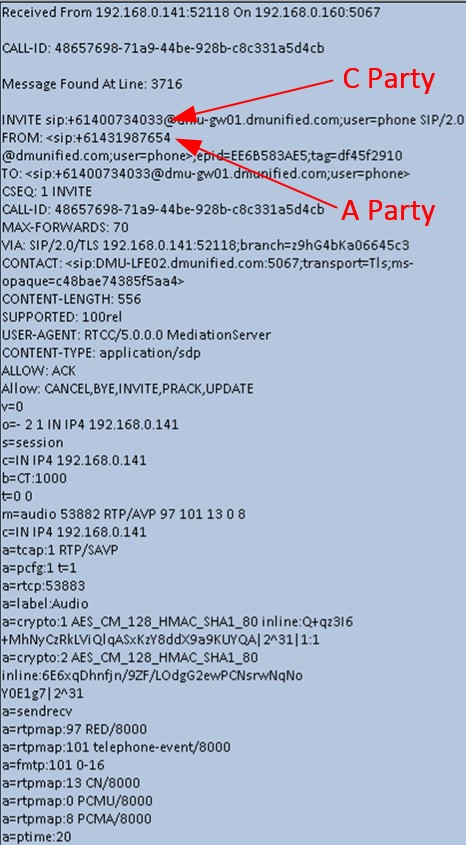
Before we configure anything, below is a trace showing no B Party information in an outbound Simultaneous Ring SIP INVITE from the Mediation Server Role:
Applying the Fix
Lync Server 2013/Skype for Business Server 2015 Configuration
Unlike the 2010 fix, there’s no need to update any Mediation Server config files. First up:
- If you are still on Lync Server 2013, ensure at least CU3 has been applied across your Lync 2013 environment
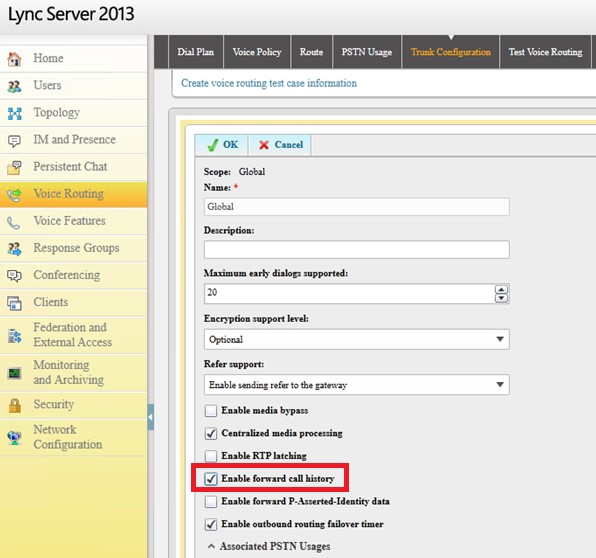
- From the Lync Control Panel, open Voice Routing > Trunk Configuration and tick Enable forward call history
- Wait for replication across your Lync environment


- Now that we’ve enabled forward call history, here’s a trace showing B Party information in the outbound SIP INVITE from Lync. Note that the B Party information is found in the HISTORY-INFO field, not the REFERRED-BY field as it was in the Lync 2010 fix:
Sonus SBC 1k2k Configuration
The following table will capture B Party information if it’s present (i.e. a Forwarded or Sim Ring call). Note the inclusion of the second entry for Redirecting Number. This allows us to use a single table for all outbound calls from Lync, regardless of whether or not HISTORY-INFO is present or not. This negates the need to use two separate tables. This is possible, as regex (.*) on a Sonus gateway means “something or nothing”. If it’s not there, it still matches, and passes through nothing:
I hope you have found this blog post useful. If you would like to know more about Lync and Sonus integration, would like a demo or would like to talk more about a solution that’s right for you, feel free to get in touch: damien.margaritis@insynctechnology.com.au.


 dmunified
Leave a reply to Nico Cancel reply